Wanna see something cool? Check out Angular Spotify 🎧
Notes from Evan You's talk at CityJS Singapore 2026: Towards a Unified Toolchain for the Web
I spoke at CityJS Singapore in 2023 and 2024, and Evan You was there both times. I never got a chance to talk to him, and 2026 was no different. I was too shy to start a chat 🤣 But at least I managed to grab a photo after his talk, Towards a Unified Toolchain for the Web. Here are some quick notes about his talk. As I am writing, I also explore and understand Vite and the oxc tooling a bit deeper, which is fascinating.
In this AI world where everything move so fast, actually understand something still make me joy.

Why JS tooling exists at all
JavaScript has no built-in tooling. It started as a simple scripting language to add some interaction to a web page. There is no js command like go, where one binary gives you go install, go fmt, go test and more.
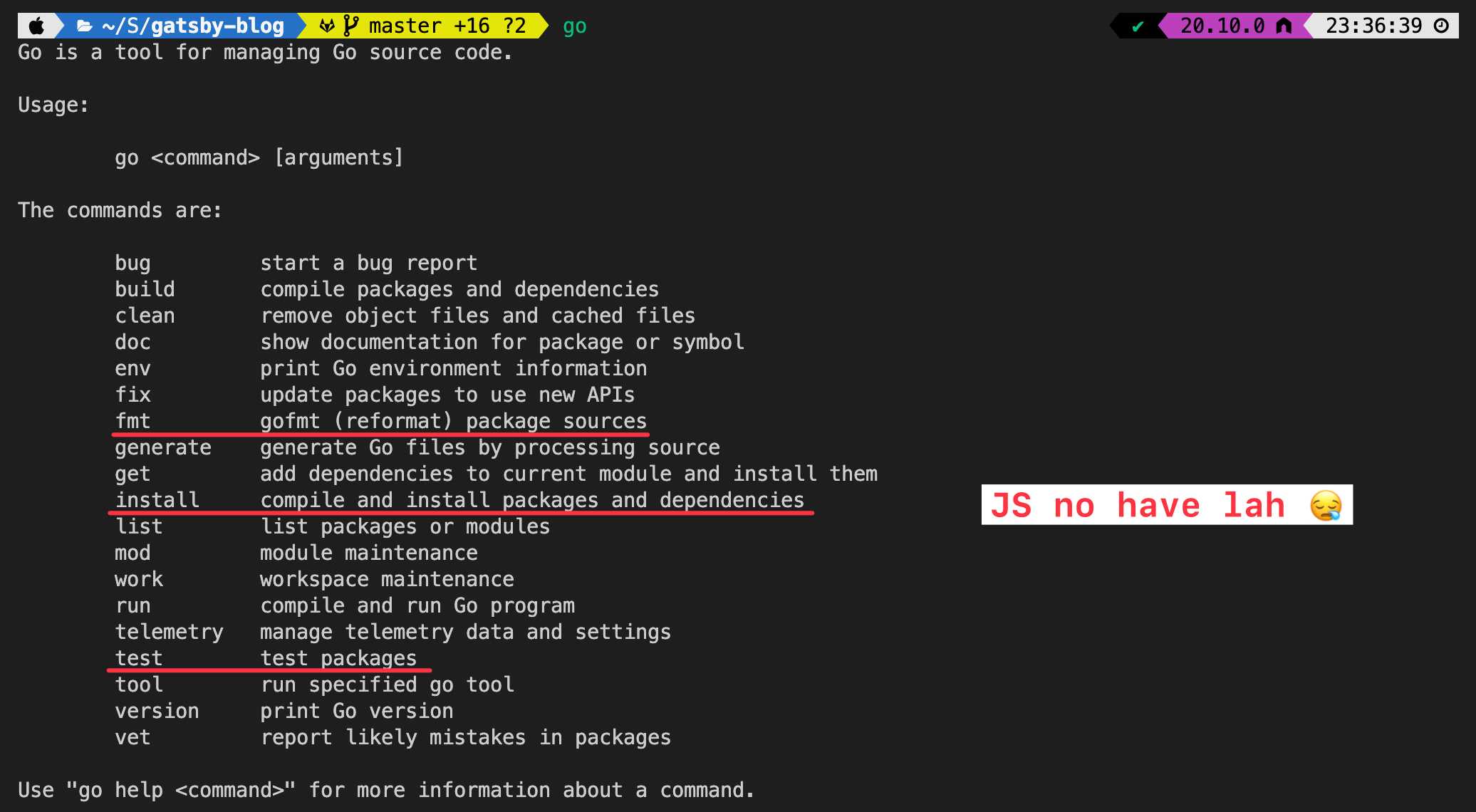
To be fair, Go was designed that way from day one. A closer example to JS is Python. Python also grew a pile of separate tools over the years: pip to install packages, virtualenv for isolated environments, pyenv to switch Python versions, pipx for CLI tools, Poetry to manage projects. Then uv came along, written in Rust by Astral, as “a single tool to replace pip, pip-tools, pipx, poetry, pyenv, twine, virtualenv, and more”, and 10 to 100x faster than pip. Keep that in mind, because this is pretty much what Vite+ is trying to do for JS, I think.
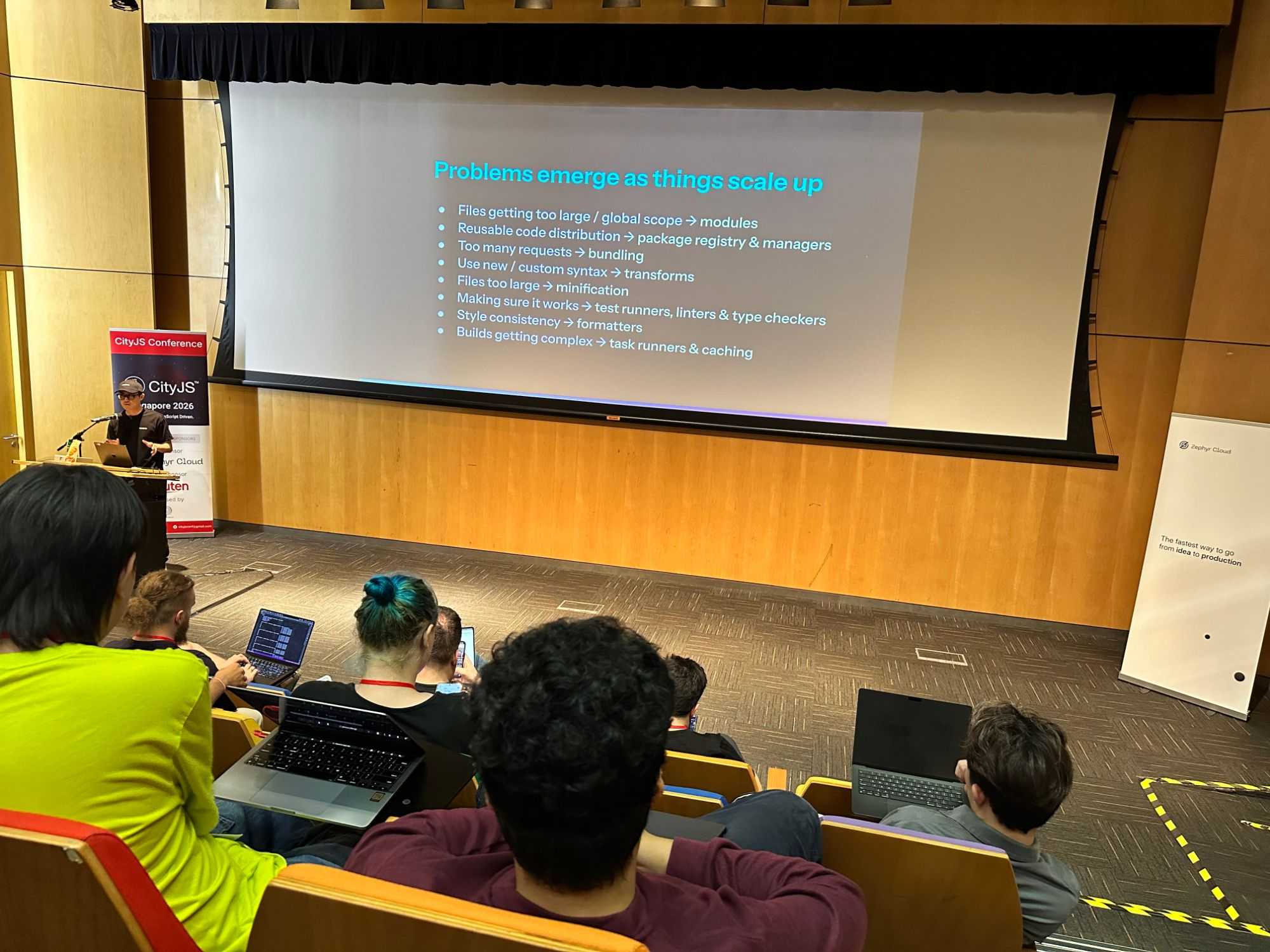
As the web grew, we started building complicated applications with JS. Today even Photoshop runs in the browser. Bigger apps brought new problems, and each problem had its own tool:
- Files too large, everything in global scope, so we got modules (CommonJS, AMD, ESM)
- Sharing reusable code, so we got a package registry and package managers (Bower, npm, Yarn, pnpm)
- Too many requests, so we got bundling (Browserify, webpack, Rollup, esbuild, Rolldown)
- New or custom syntax, so we got transforms (we want to write ES2015 and TypeScript and still run it in the browser: Babel, swc, Oxc)
- Files still too large, so we got minification (UglifyJS, Terser, esbuild)
- Making sure it works, so we got test runners, linters and type checkers (Mocha, Jest and Vitest for tests, ESLint and Oxlint for linting, tsc and tsgo for types)
- Style consistency, so we got formatters (Prettier, Biome, Oxfmt)
- Builds getting complex, so we got task runners and caching (Grunt, Gulp, and later monorepo tools like Nx and Turborepo)
Tooling words in plain English
If you do not work on tooling, words like transform or bundler might not mean much. Here is a quick recap:
| Term | What it does | Examples |
|---|---|---|
| Module | Lets you split code into files that import from each other, instead of one big file where everything is a global variable | CommonJS, ESM |
| Package manager | Downloads libraries other people wrote into node_modules |
npm, yarn, pnpm |
| Parser | Reads your code as text and turns it into a tree that other tools can work with | acorn, Oxc |
| Transform | Rewrites code the browser does not understand into plain JS, e.g TypeScript to JS: let n: number = 1 → let n = 1 |
Babel, swc, Oxc |
| Bundler | Combines hundreds of files into a few bundles (big JS files), so the browser makes fewer requests | webpack, Rolldown |
| Minifier | Shrinks the code by removing spaces and shortening names | Terser, esbuild |
| Linter | Checks your code against a set of rules and flags likely mistakes, like == where you meant === |
ESLint, Oxlint |
| Formatter | Fixes spacing, quotes and line breaks so all code looks the same | Prettier, Oxfmt |
| Test runner | Runs your test files and reports which ones pass | Jest, Vitest |
| Task runner | Runs these steps in order, and skips steps whose input did not change | Nx, Turborepo |
Frankly speaking, I had never actually run a parser and looked at the output. I only knew roughly what it looks like in theory 😂
So while writing this post, I tried Oxc on a small JavaScript function.
// greet.js
function greet(name) {
  return 'Hello, ' + name
}
Oxc has a Node binding called oxc-parser, so I used that.
Here is a small script that parses a file and writes the AST to JSON:
// parse.mjs
import { readFileSync, writeFileSync } from 'node:fs'
import { parseSync } from 'oxc-parser'

const file = process.argv[2]
const { program, errors } = parseSync(file, readFileSync(file, 'utf8'))

if (errors.length) console.error(errors)
writeFileSync(`${file}.ast.json`, JSON.stringify(program, null, 2))
console.log(`${file}.ast.json`)
Then run it with node parse.mjs greet.js.
Here is the full output:
See the full AST of greet.js
{
  "type": "Program",
  "body": [
    {
      "type": "FunctionDeclaration",
      "id": {
        "type": "Identifier",
        "name": "greet",
        "start": 9,
        "end": 14
      },
      "generator": false,
      "async": false,
      "params": [
        {
          "type": "Identifier",
          "name": "name",
          "start": 15,
          "end": 19
        }
      ],
      "body": {
        "type": "BlockStatement",
        "body": [
          {
            "type": "ReturnStatement",
            "argument": {
              "type": "BinaryExpression",
              "left": {
                "type": "Literal",
                "value": "Hello, ",
                "raw": "'Hello, '",
                "start": 32,
                "end": 41
              },
              "operator": "+",
              "right": {
                "type": "Identifier",
                "name": "name",
                "start": 44,
                "end": 48
              },
              "start": 32,
              "end": 48
            },
            "start": 25,
            "end": 48
          }
        ],
        "start": 21,
        "end": 50
      },
      "expression": false,
      "start": 0,
      "end": 50
    }
  ],
  "sourceType": "script",
  "hashbang": null,
  "start": 0,
  "end": 51
}
And here is how each node in that output maps back to the source code:
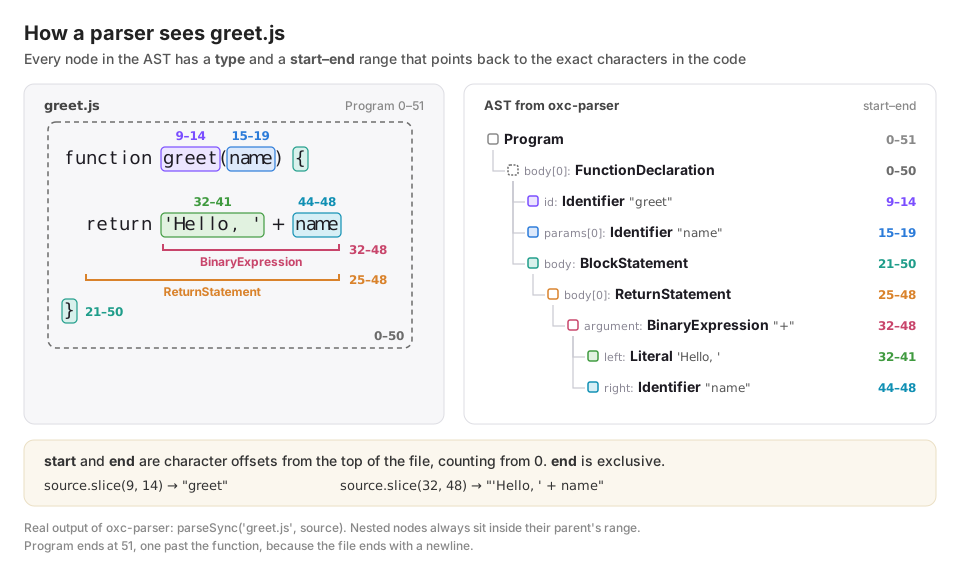
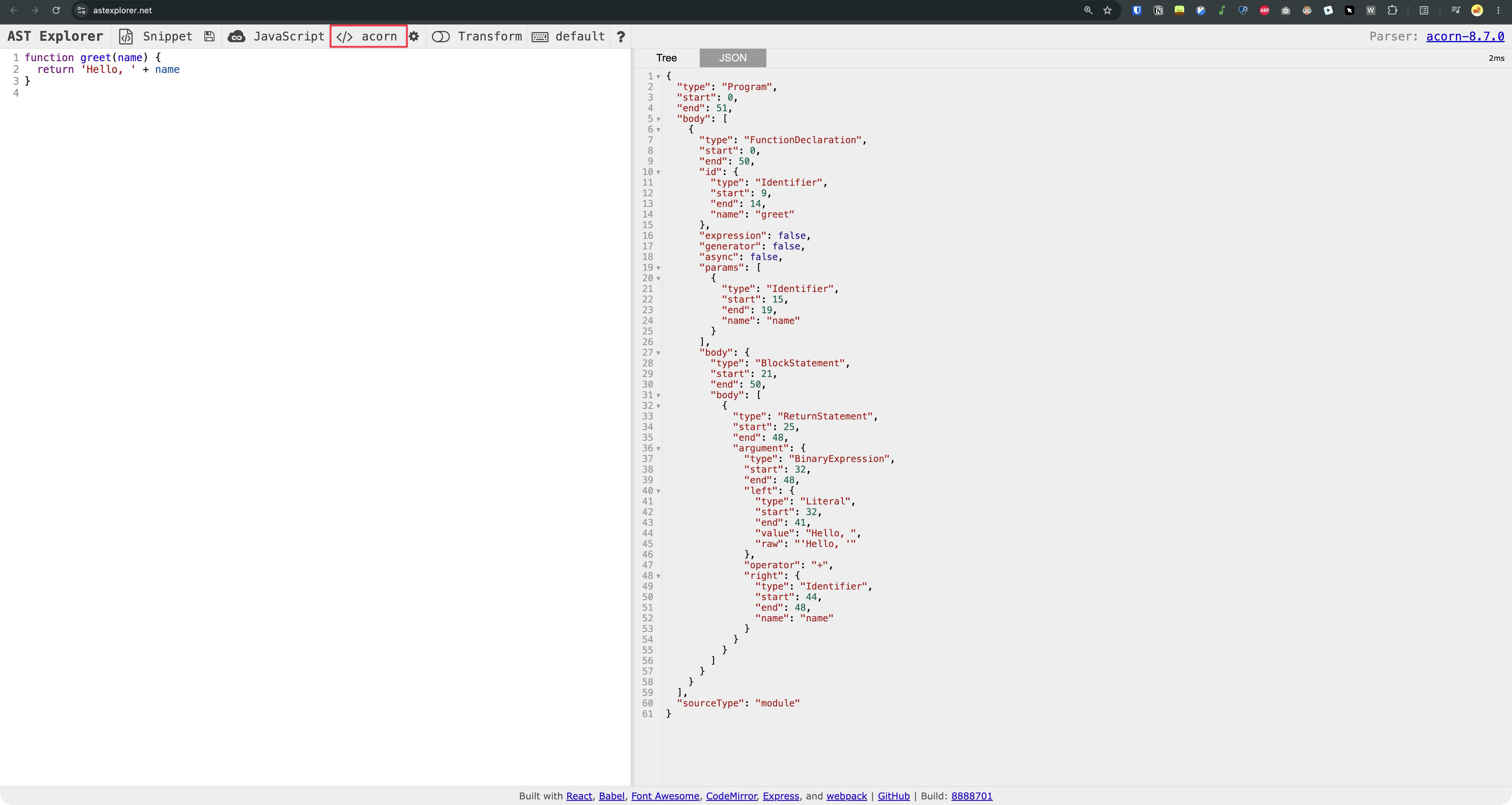
The output of a parser is called an AST, short for Abstract Syntax Tree. I also pasted the same greet.js into AST Explorer with the acorn parser, and the output looks almost exactly like what Oxc gave me. Turns out the oxc-parser README already mentions it:
When parsing JS or JSX files, the AST returned is fully conformant with the ESTree standard, the same as produced by Acorn.
ESTree is the shared spec for what a JavaScript AST looks like, so tools built for one parser can work with the output of another.
So why does a tree matter? I have never worked with an AST directly, so I did some reading. Here is what stood out:
- Most tools start from the AST. Babel parses your code, changes the tree, then prints it back as code. ESLint walks the tree to check your rules, and Prettier reprints it with its own formatting.
- Finding code is more reliable than a text search. An ESLint selector like
CallExpression[callee.name='require']matches everyrequire()call, however it is formatted. - Changing code is safer. Codemod tools like jscodeshift edit the tree, e.g. to rename a function everywhere, then print the code back.
- Errors point to the exact spot. The
startandendon each node is how ESLint knows which line to flag. - Every tool needs to parse, so a fast parser speeds everything up. Oxc’s parser is at least 3x faster than swc, and VoidZero wants all their tools to share the same AST instead of parsing the same code again in every tool.
Two generations of tools
Evan called the first generation The OGs, tools for JS written in JS: babel, acorn, esprima, browserify, webpack, rollup, mocha, jest, uglifyjs, terser, eslint, prettier, tsc, gulp, grunt, npm, yarn. When he asked who had used them, a lot of hands went up. People who started web development a bit later may never have touched most of them.

Back in 2016 I was a frontend engineer writing Angular for a living. Angular apps were loaded through SystemJS, with hundreds of files on every page load. webpack came later, and I remember configuring it for several smaller Angular apps with very little documentation. What a time 🤣
Every time I searched for npm vs Bower, I found the same confused questions. Nobody seemed sure which tool did what, so I answered one of them as best I could: NPM vs. Bower vs. Browserify vs. Gulp vs. Grunt vs. Webpack. It somehow became my most popular answer ever. Back then everyone wanted a nice looking GitHub and Stack Overflow profile, and I never imagined an answer of mine would get more than 700 upvotes.
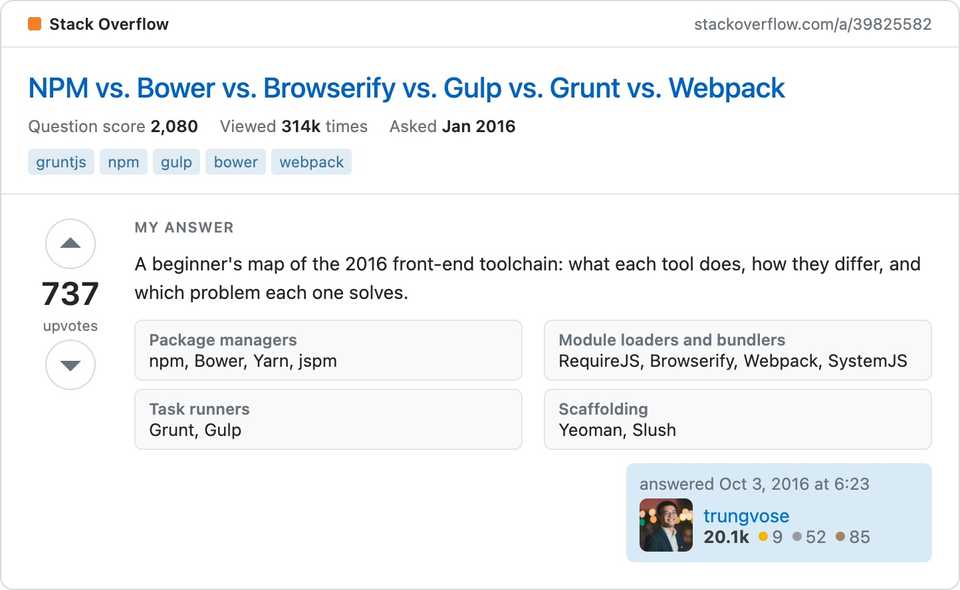
I bring it up because a few of the tools in that answer are on Evan’s slide hehe.
Then came the next gen, tools for JS written in native languages, mostly from the last 5 years: swc, oxc, biome, esbuild, rspack, turbopack, rolldown, tsgo, turborepo, nx, jsr, vlt, bun.
Most of them are written in Rust: swc, oxc, biome, rspack, turbopack, rolldown and turborepo. esbuild and tsgo are written in Go. Bun was written in Zig at the time of the talk, and has since been rewritten in Rust.
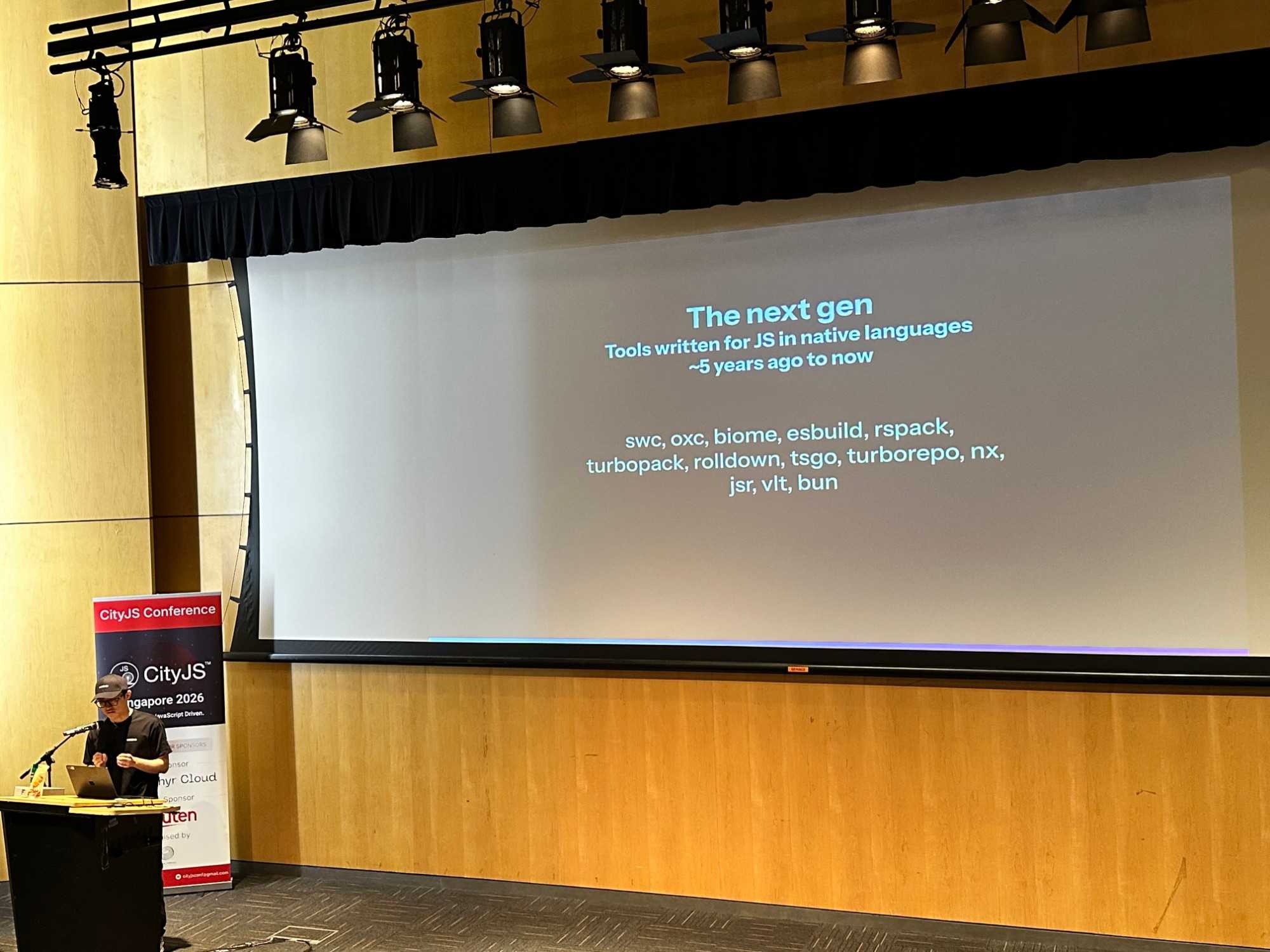
Rust being the main choice did not surprise me. Back in 2021, I read Rust Is Eating JavaScript by Lee Robinson, about Rust slowly replacing parts of the JS tooling. A few tools from that post I still remember:
- SWC stands for Speedy Web Compiler. It was created in 2017 in Rust, and it handles compiling and minifying.
- Deno was created in 2018. It is a runtime for JavaScript and TypeScript, built with Rust on top of V8. Its linter, formatter and docs generator are built using SWC.
- Rspack is a Rust bundler that works with webpack config and is much faster than webpack. Lee added it later, the post is still being updated.
Native vs JS
The speed difference between native and JS tools is huge:
| Tool | Speed up |
|---|---|
| swc vs babel | 20 to 70x |
| oxlint vs eslint | 50 to 100x |
| rolldown vs rollup | 14 to 28x |
| tsgo vs tsc | 10x |
| bun vs npm | 15x |
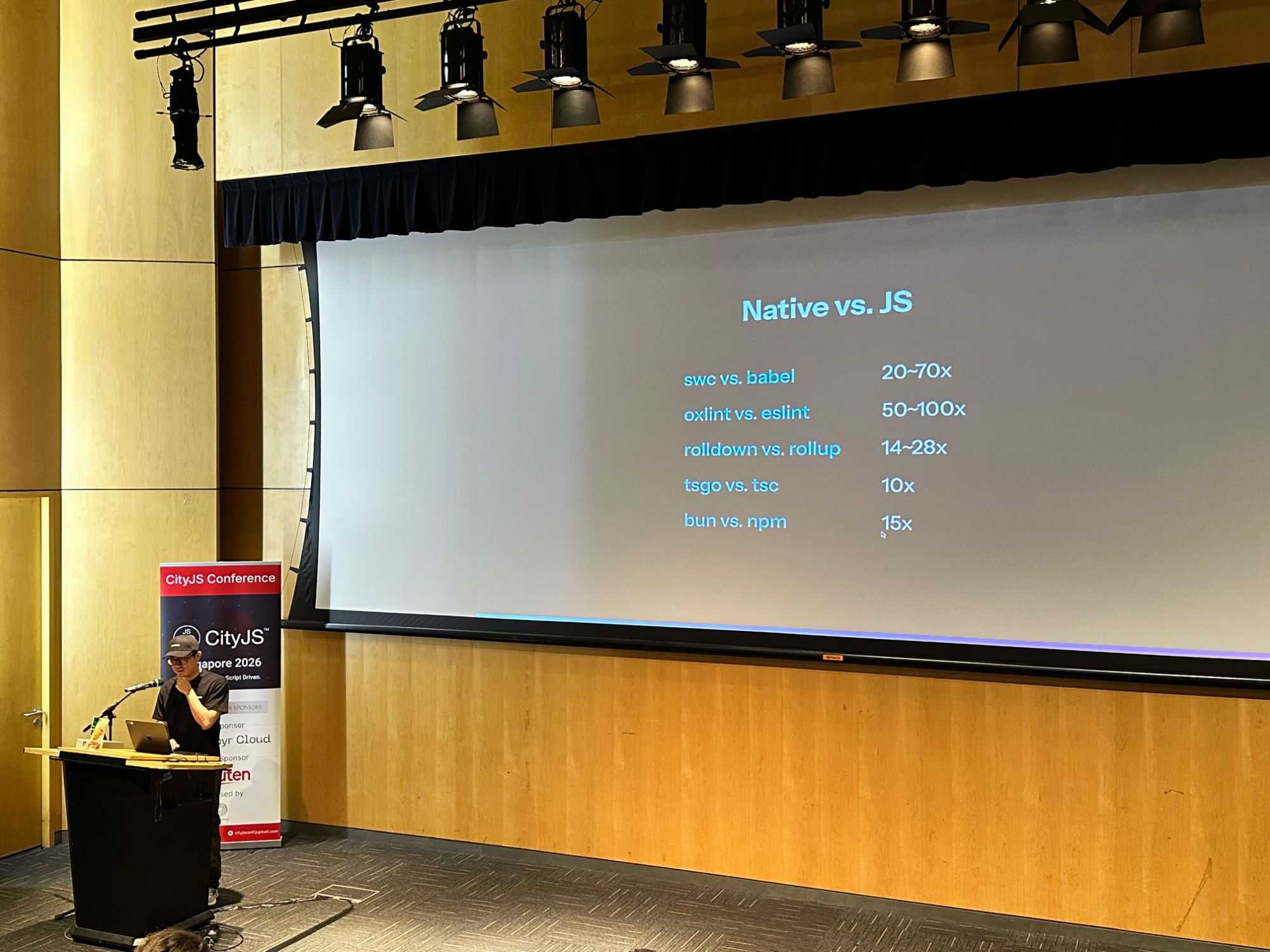
Even the lowest number on that slide is 10x. That is definitely not a small improvement :)
So why is native that much faster? A few reasons I picked up while reading about it.
- Rust and Go are compiled to machine code once, before you run anything. A JS tool runs on Node, and Node uses V8, the same JS engine as Chrome. V8 compiles JS just in time, while the tool runs. All JS is first compiled to bytecode and interpreted, and only the hot code gets optimized into fast machine code later (V8 blog). So part of every run goes into compiling, and code that never gets hot never gets the fast version. A Rust or Go tool did all of that work before you ran it, so every function is already optimized machine code from the start.
- Node runs your code on a single thread by default. Rust and Go make it easy to use every CPU core, so on an 8 core laptop Oxlint can lint 8 files at the same time, while ESLint by default goes one file after another.
- Memory is the last one. JS objects carry extra overhead, and the garbage collector pauses every now and then to clean up. Rust has no garbage collector, it frees memory as soon as it is done with it.
Vite+: the whole VoidZero toolchain in one CLI
The highlight of the talk for me was Vite+ (Vite Plus).
VoidZero, the company Evan announced in 2024, maintains Vite, Vitest, Rolldown and Oxc. Vite+ puts all of them behind a single CLI called vp, and it also manages your Node version and package manager.
| Command | What it does | What you used before |
|---|---|---|
vp create |
Scaffold an app, a library or a monorepo | npm create vite, create-react-app |
vp install |
Install dependencies with the project’s package manager | npm install, pnpm install, yarn |
vp dev |
Start the dev server (Vite) | vite, webpack serve |
vp check |
Format, lint and type check in one go (Oxfmt, Oxlint, tsgolint) | eslint, prettier --check, tsc --noEmit |
vp test |
Run tests (Vitest) | jest, vitest |
vp build |
Production build (Vite + Rolldown) | vite build, webpack |
vp run |
Run package.json scripts and tasks, with caching |
npm run, turbo run, nx run |
vp env |
Pick the Node and package manager version, reads .nvmrc too |
nvm use, corepack |
Think about a typical frontend project today: webpack or Vite, Babel, ESLint, Prettier, Jest, each one with its own config file and its own version to upgrade.
Vite+ replaces that with one tool and one config file. Yes, one config file.
Here is the root folder of my Angular Spotify app, with a config file for almost every tool. If it could move to Vite+, this is roughly how it would look. So simple:
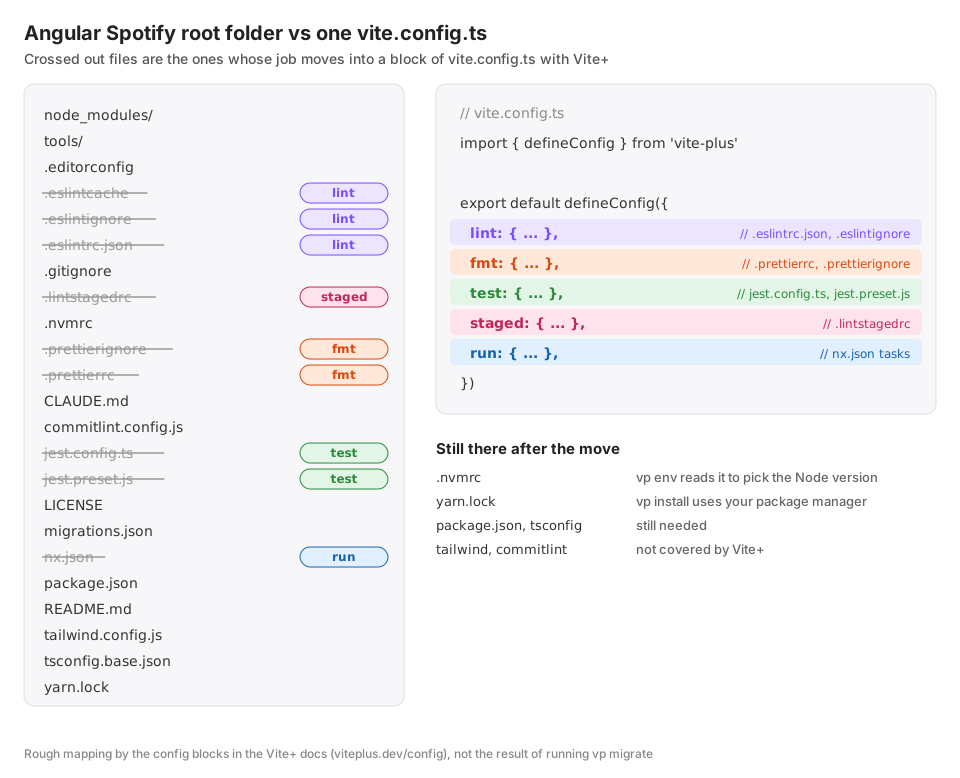
Migrating an Angular app is not that straightforward 😆, so I created a fresh monorepo with Vite+ instead. First, install it:
curl -fsSL https://vite.plus | bashThen run:
vp createIt asked me a bunch of questions and ba da bing ba da boom, a monorepo is created.
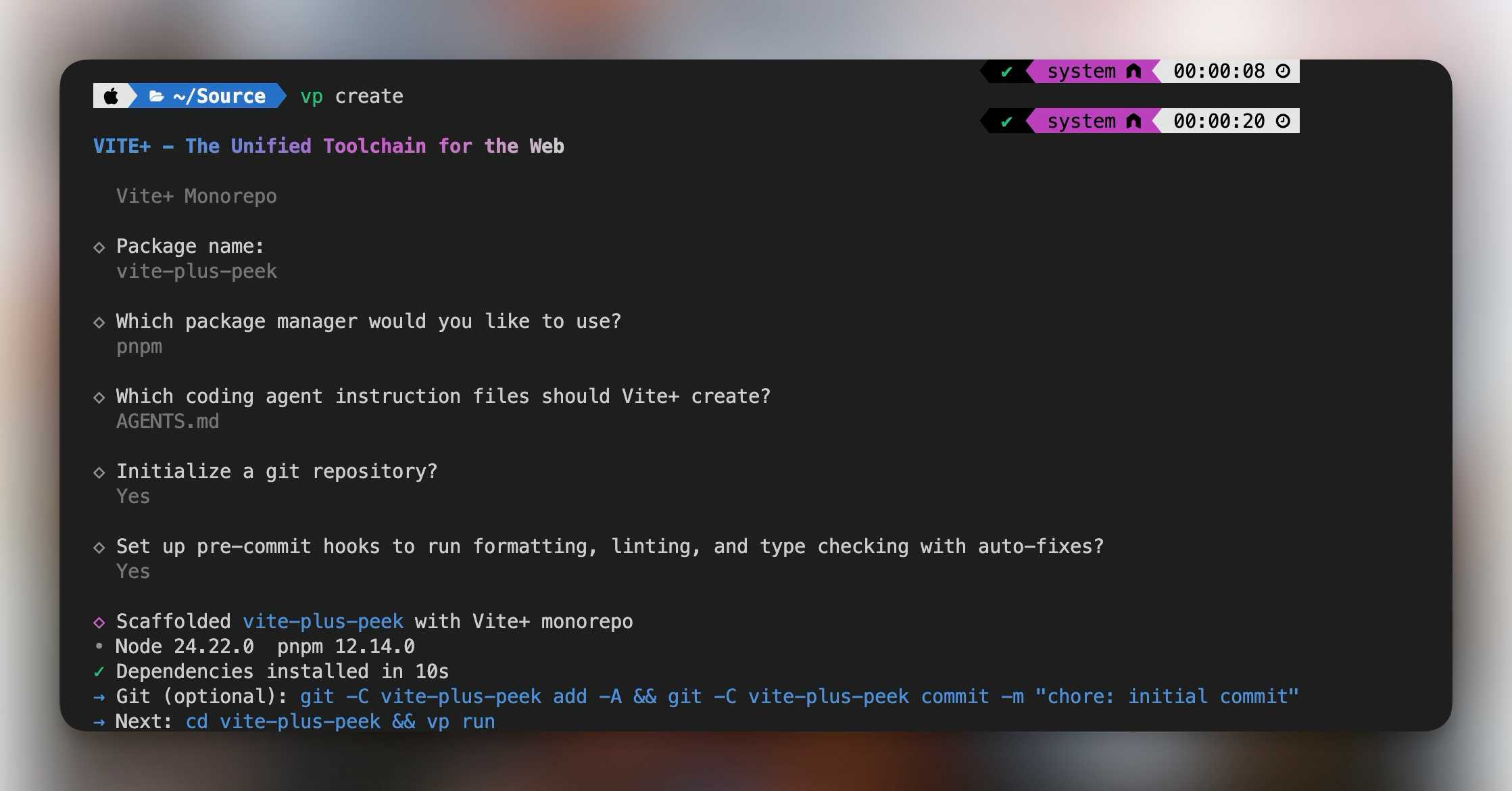
Here is the folder structure. Very lean, and again, a single vite.config.ts.
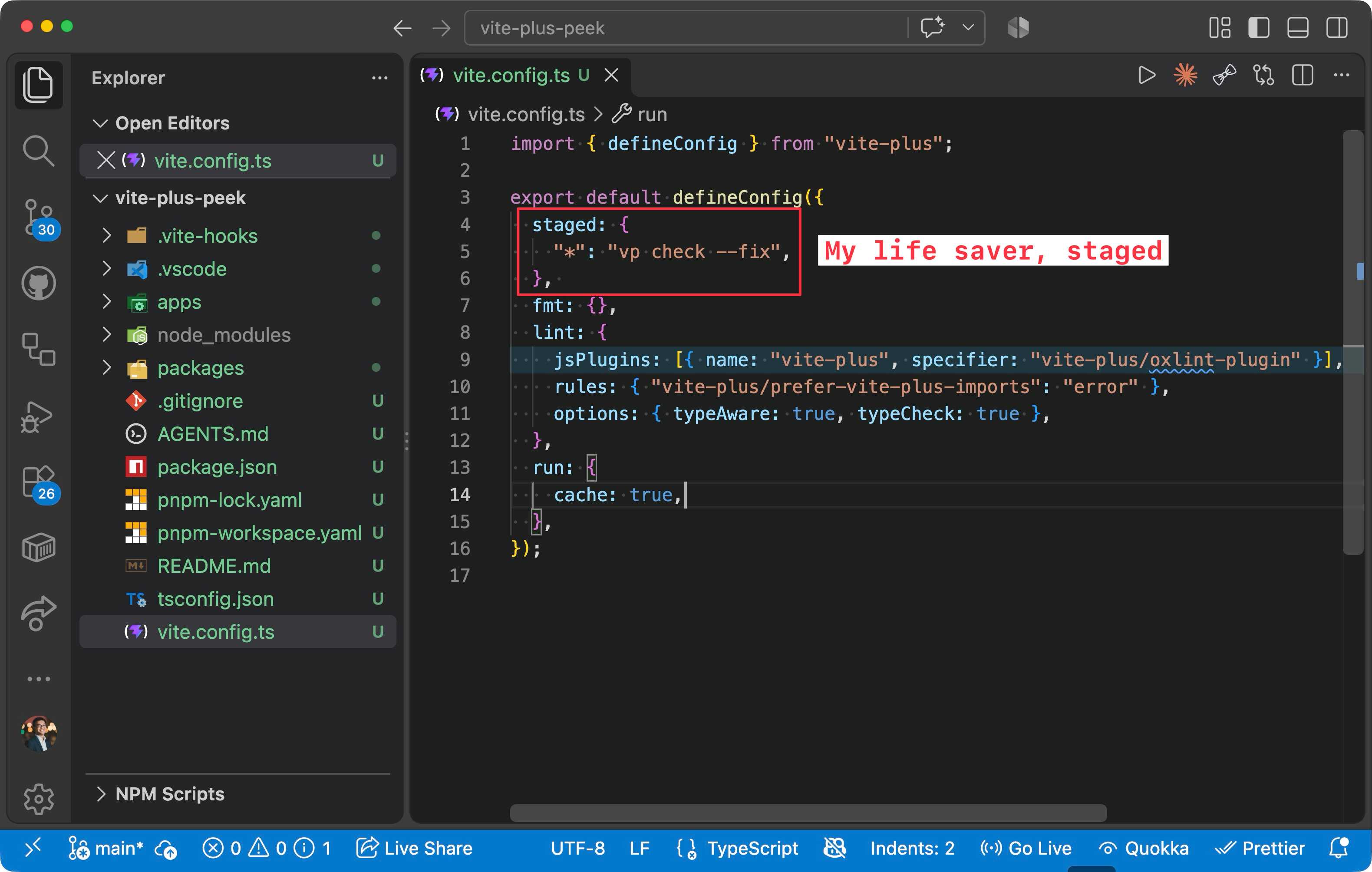
What impressed me most is staged. It runs a command against the files currently staged in Git, here vp check --fix. Before, you needed lint-staged for that, plus husky to wire up the Git hook, and it was so easy to get wrong. I remember losing hours just setting up husky and lint-staged. If you have been through that, you will be happy to see Vite+ handle both: vp staged runs the staged checks (it bundles lint-staged under the hood) and vp create set up the Git hook for me in .vite-hooks.
I was too excited during the Vite+ part and forgot to take a photo. This slide shows the stack it is built on:
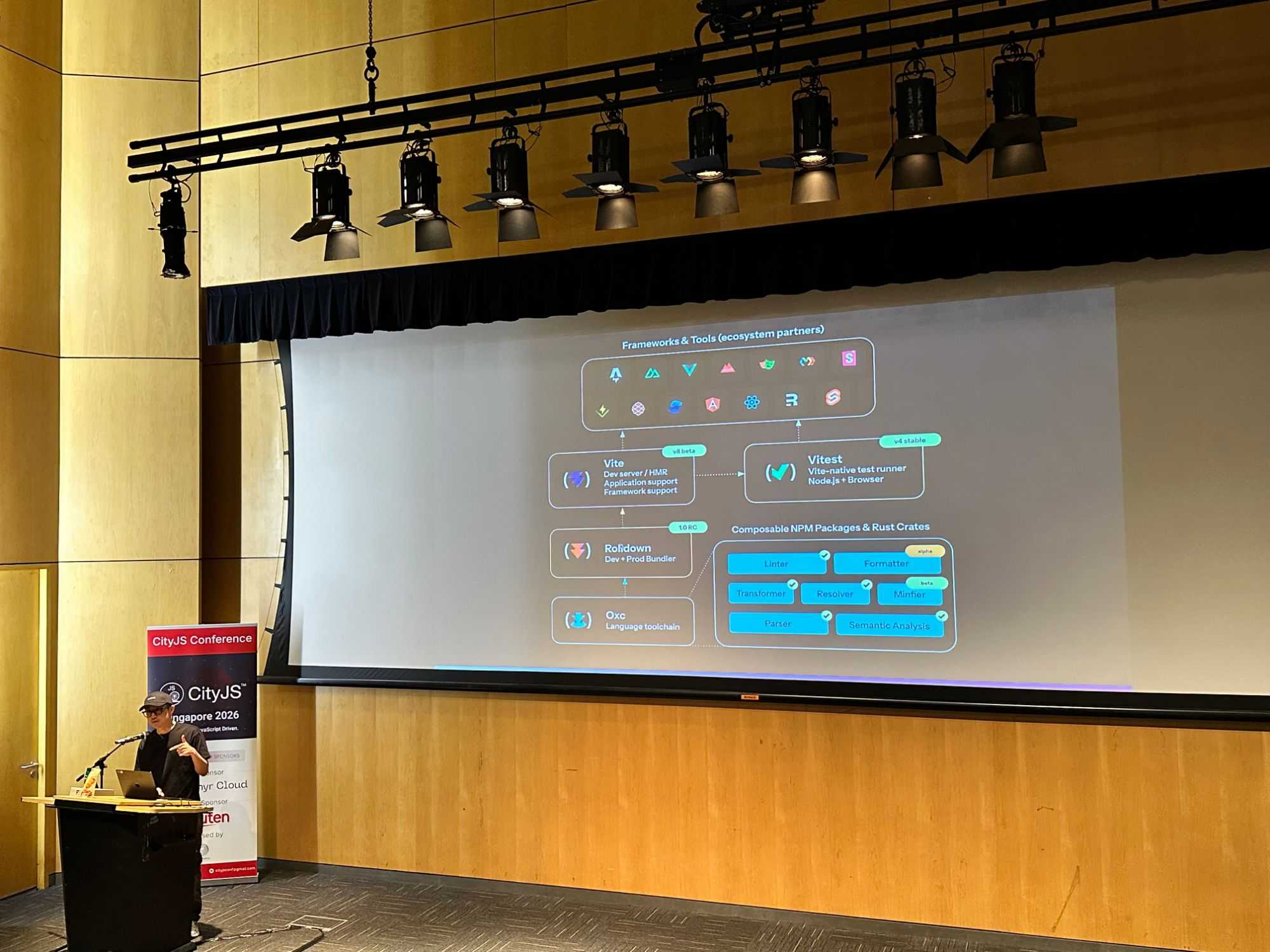
Reading the slide from the bottom up:
| Tool | What it does | Older tool it replaces |
|---|---|---|
| Oxc | Parses and transforms JS and TS, also powers Oxlint and Oxfmt | Babel, ESLint, Prettier |
| Rolldown | Pre-bundles dependencies in dev, bundles your app for production | Rollup, esbuild |
| Vite | Dev server and build tool | webpack dev server, Create React App |
| Vitest | Runs your tests | Jest |
| Vite+ | One CLI that wraps all of the above | several config files |
Vite sits in the middle of that stack, and it is already the backbone of a lot of frameworks: Vue, Nuxt, SvelteKit, Astro, React Router and SolidStart all run on it.
When the React team deprecated Create React App in 2025, Vite was one of the tools they pointed people to.
Agents change the reason for speed
Evan also made a point about why all this speed matters more now than before.
Developer experience was always about the feedback loop. Type check, lint, build, see the result, repeat. Now an agent often runs that loop for you.
When the model replies in seconds, a 30 second type check or a slow build is the bottleneck again. The agent waits just like we used to, only it runs that loop many more times per hour.
Faster tools help both humans and agents, so VoidZero now has one more reason to keep pushing on performance.
Wait, what is Vite?
That is the talk. After it, I wanted to understand what these tools actually do under the hood, starting with Vite. Many people I talk to have heard of Vite but are not sure what it does, so here is a bit of background.
Short version:
- In development, Vite runs a dev server for your app, like
webpack serve --mode development. - For production, Vite builds your app into static files you can deploy, like
webpack --mode production.
If you have never gone that deep, that is a lot to take in. So let’s look at how Vite runs your app in development, and why its dev server is so fast.
How webpack does it
Evan created Vite (French for fast, pronounced veet) in 2020, first for Vue. Before that, most of us used webpack, often hidden behind Create React App or Vue CLI. Every npm start meant webpack bundled the entire application before showing you anything, so big apps took a long time to start.
Here is how a bundle-based dev server works, a diagram from the Why Vite guide. I think every developer should read it, but in reality only a few do 😂
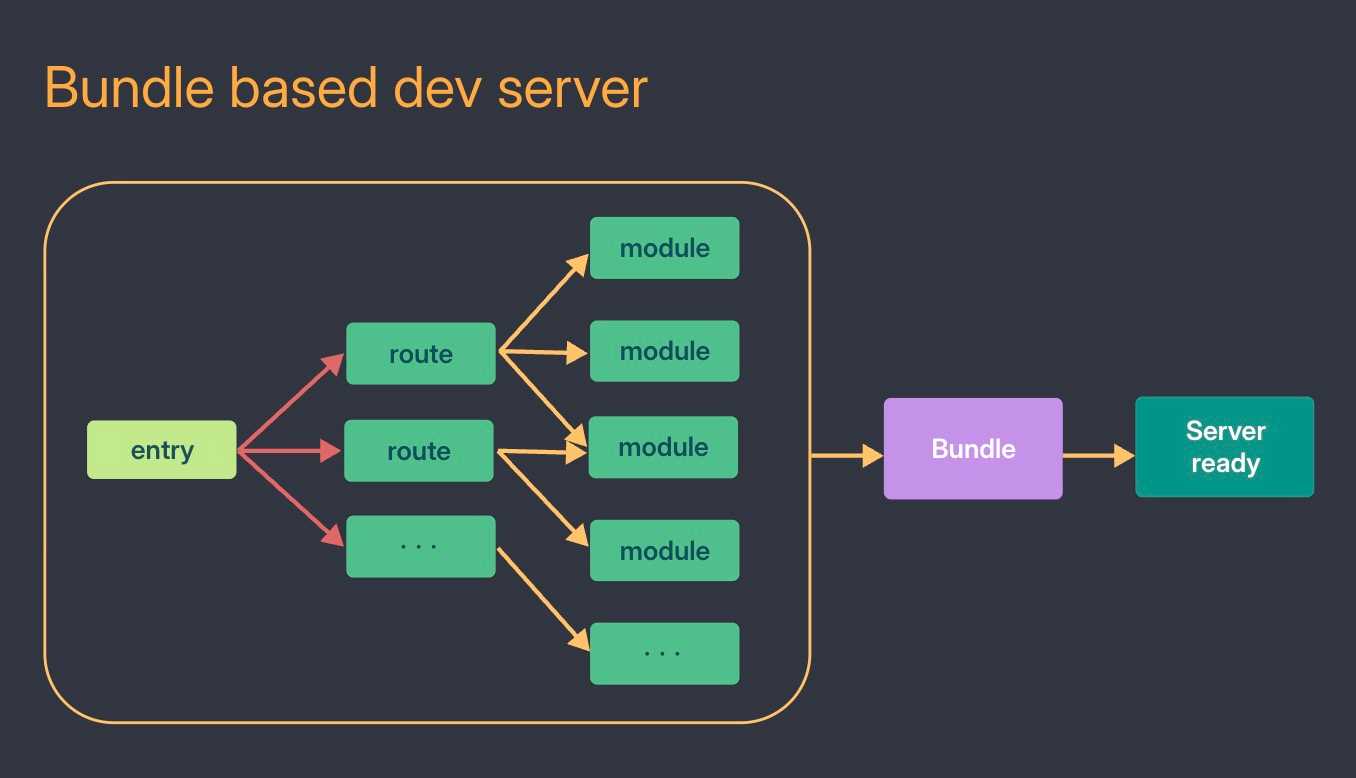
You might say your routes are code split. But to code split, webpack still has to go through the whole app and build a chunk for every lazy route before the dev server is ready, so you still wait. To be fair, webpack has an experimental lazyCompilation option that only compiles dynamic imports when they are used, but it is not on by default.
Setting up webpack yourself was also a lot of config. I took the same React app from the Vite template, kept main.tsx and App.tsx as they are, and set it up with webpack. To get the same thing working, I needed 10 dev dependencies and two config files, webpack.config.js and babel.config.json.
webpack starts from the entry, our main.tsx, follows every import from there, and runs each file through the matching rule.
// webpack.config.js
const path = require('node:path')
const HtmlWebpackPlugin = require('html-webpack-plugin')
const CopyWebpackPlugin = require('copy-webpack-plugin')

module.exports = {
  entry: './src/main.tsx',
  output: {
    path: path.resolve(__dirname, 'dist'),
    filename: '[name].[contenthash].js',
    clean: true,
  },
  resolve: {
    extensions: ['.tsx', '.ts', '.js'],
  },
  module: {
    rules: [
      {
        // TypeScript and JSX go through Babel
        test: /\.[jt]sx?$/,
        exclude: /node_modules/,
        use: 'babel-loader',
      },
      {
        // so `import viteLogo from './assets/vite.svg'` works
        test: /\.(svg|png|jpe?g|gif)$/,
        type: 'asset/resource',
      },
    ],
  },
  plugins: [
    // inject the bundle into index.html
    new HtmlWebpackPlugin({ template: './index.html' }),
    // copy favicon.svg from public/
    new CopyWebpackPlugin({ patterns: [{ from: 'public' }] }),
  ],
  devServer: {
    port: 3000,
    hot: true,
  },
}
// babel.config.json
{
"presets": [
"@babel/preset-env",
["@babel/preset-react", { "runtime": "automatic" }],
"@babel/preset-typescript"
]
}npm i -D webpack webpack-cli webpack-dev-server \
babel-loader @babel/core @babel/preset-env @babel/preset-react @babel/preset-typescript \
html-webpack-plugin copy-webpack-pluginEvery line there is something you had to know. Remove the asset/resource rule and the build fails on vite.svg. Forget resolve.extensions and import App from './App' cannot find the file.
To be fair, webpack got better. Most webpack setups you find online still add css-loader and style-loader, but since 5.109, webpack handles import ‘./App.css’ on its own (still marked experimental).
Here is the Vite config for the exact same app, two dev dependencies, vite and @vitejs/plugin-react:
// vite.config.ts
import react from '@vitejs/plugin-react'
import { defineConfig } from 'vite'

export default defineConfig({
  plugins: [react()],
})
TypeScript, CSS imports, images, index.html and the public folder all work out of the box.
Why is Vite so fast?
Vite does the opposite of a bundle-based dev server. It splits your modules into two groups:
- Source code, your application code that changes often, is served on demand over native ESM.
- Dependencies, libraries that rarely change like React, are pre-bundled once with fast native tooling.
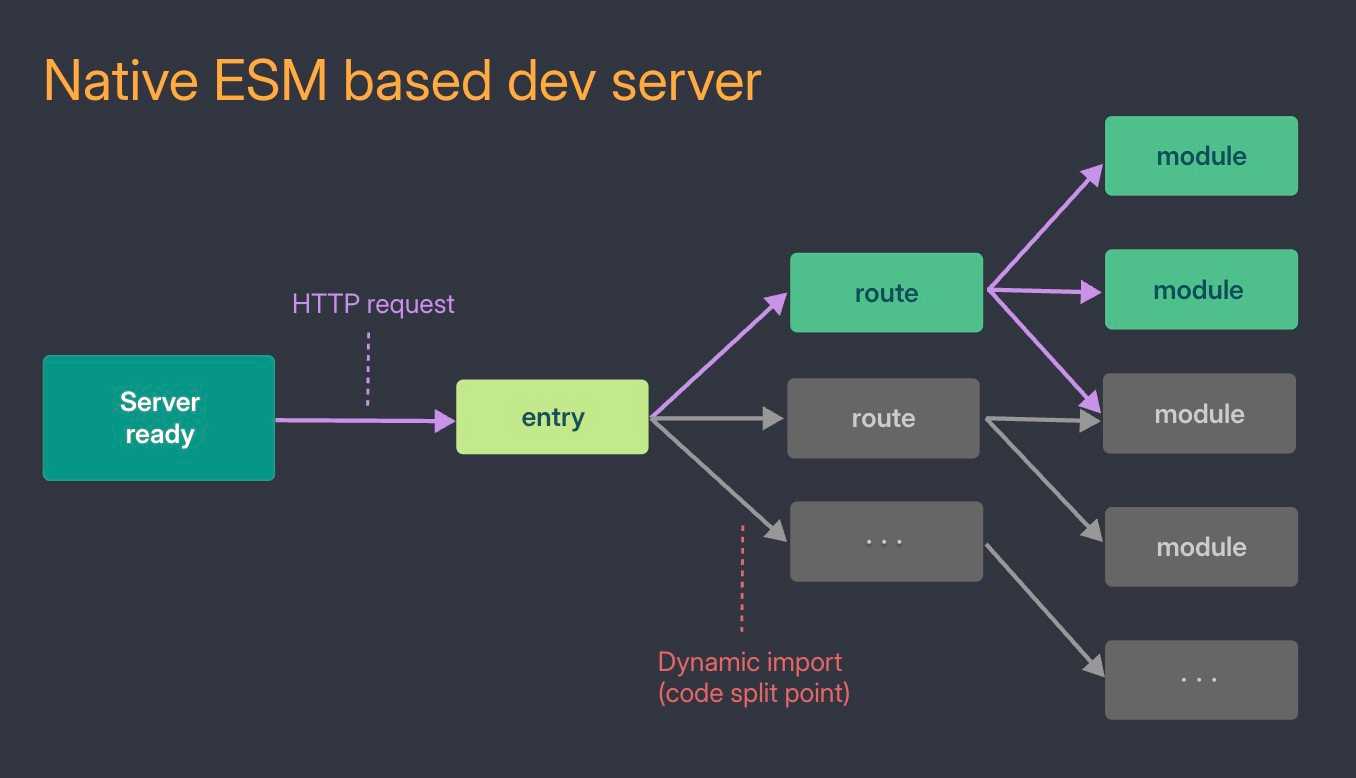
Let’s go through them one by one.
Native ESM: the browser follows the imports
Remember JavaScript started as small scripts on a page, so for a long time the browser had no way to split code into files that import each other. That is why we needed bundlers in the first place.
Modern browsers understand import on their own, this is called native ES modules. You add type="module" to the script tag:
<script type="module" src="/src/main.js"></script>// /src/main.js
import { greet } from './greet.js'
greet()The browser loads main.js, sees that it imports greet.js, and fetches greet.js by itself. No bundler needed. Safari and Chrome shipped this in 2017 and Firefox in 2018, a few years before Vite came out.
Here is what that looks like in the Network tab:
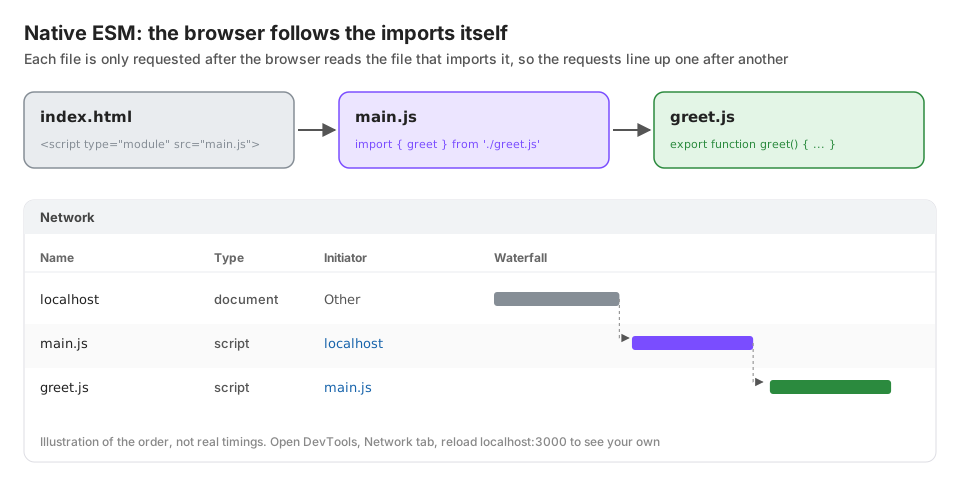
That is what people mean when they say Vite serves your code over native ESM.
Vite transforms each file when the browser asks for it
But wait a second. We usually write main.tsx, not main.js, and we import packages too. Here is the entry file of our React app (simplified):
// /src/main.tsx
import { createRoot } from 'react-dom/client'
import App from './App.tsx'
import './index.css'

createRoot(document.getElementById('root')!).render(<App />)
Without any processing, the browser would fail on almost every line:
'react-dom/client'is a package name undernode_modules, not a URL. The browser has no idea whatnode_modulesis.!is TypeScript and<App />is JSX. Neither is valid JavaScript.- The browser cannot import a
.cssfile like a JS module.
So let’s see how Vite serves this exact app. It starts with index.html, where Vite adds a few script tags before our own:
- An inline script that imports
/@react-refresh. This one comes from@vitejs/plugin-reactand powers React Fast Refresh: you save a file and the change shows up without a page reload, keeping your component state. <script type="module" src="/@vite/client"></script>, Vite’s own client that listens for file changes over a WebSocket.- Then our code,
<script type="module" src="/src/main.tsx"></script>, loaded as a native module like before.
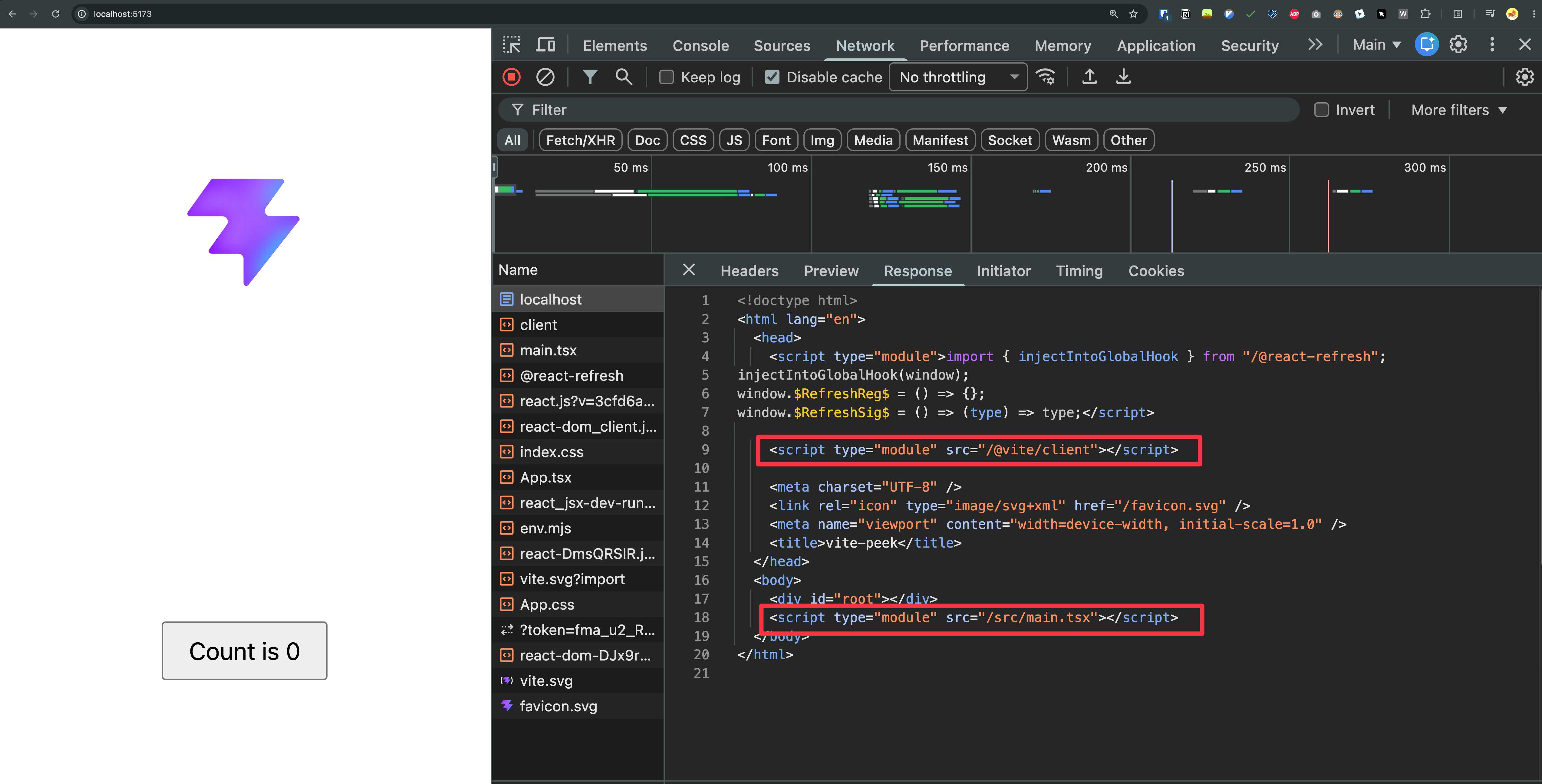
Now look at main.tsx as Vite serves it. Package names become real URLs, like /node_modules/.vite/deps/react-dom_client.js, and TypeScript and JSX are compiled to plain JavaScript:
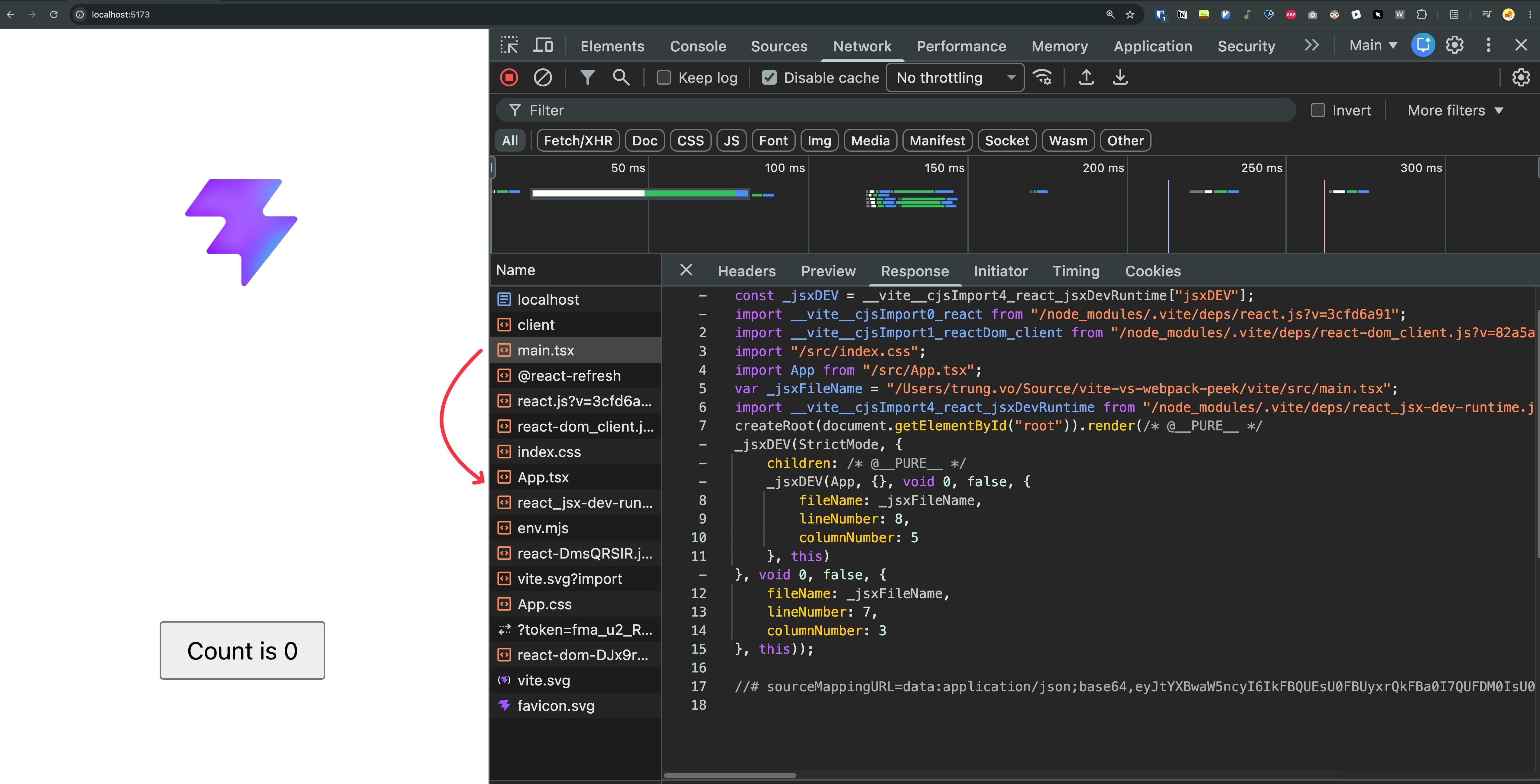
And index.css is served as a small JS module that injects a <style> tag:
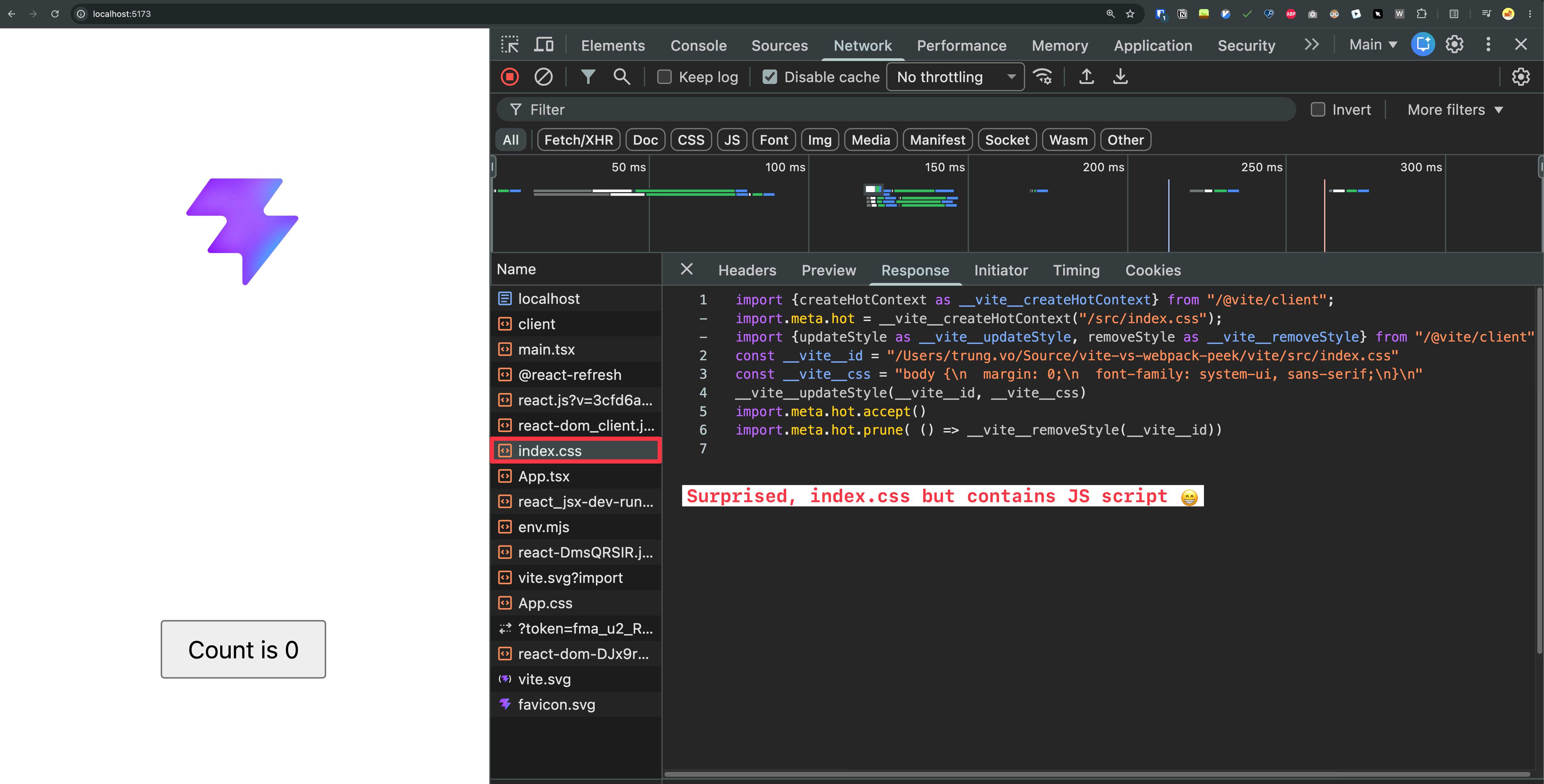
Then the browser follows the imports and asks for App.tsx, and Vite does the same to that file.
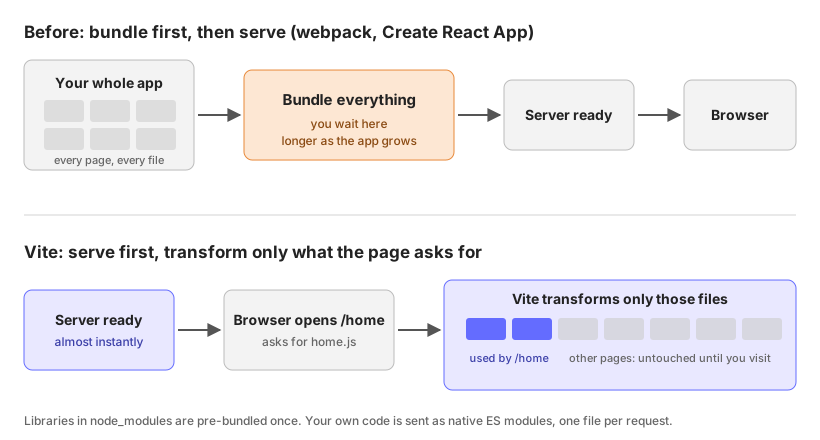
The key part: Vite only does this when the browser asks for a file. It does not process your app upfront. If you open /home, the files for /settings are never requested, so they are never transformed. That is why the Vite dev server start time barely grows with the size of your app.
Dependencies are pre-bundled once
Packages are the one exception. Many of them, React included, ship as CommonJS, which the browser cannot import. Others are hundreds of small files: import { debounce } from 'lodash-es' would make the browser fire 600+ requests, one for each internal module, and browsers usually run only 6 requests in parallel per domain over HTTP/1.1.
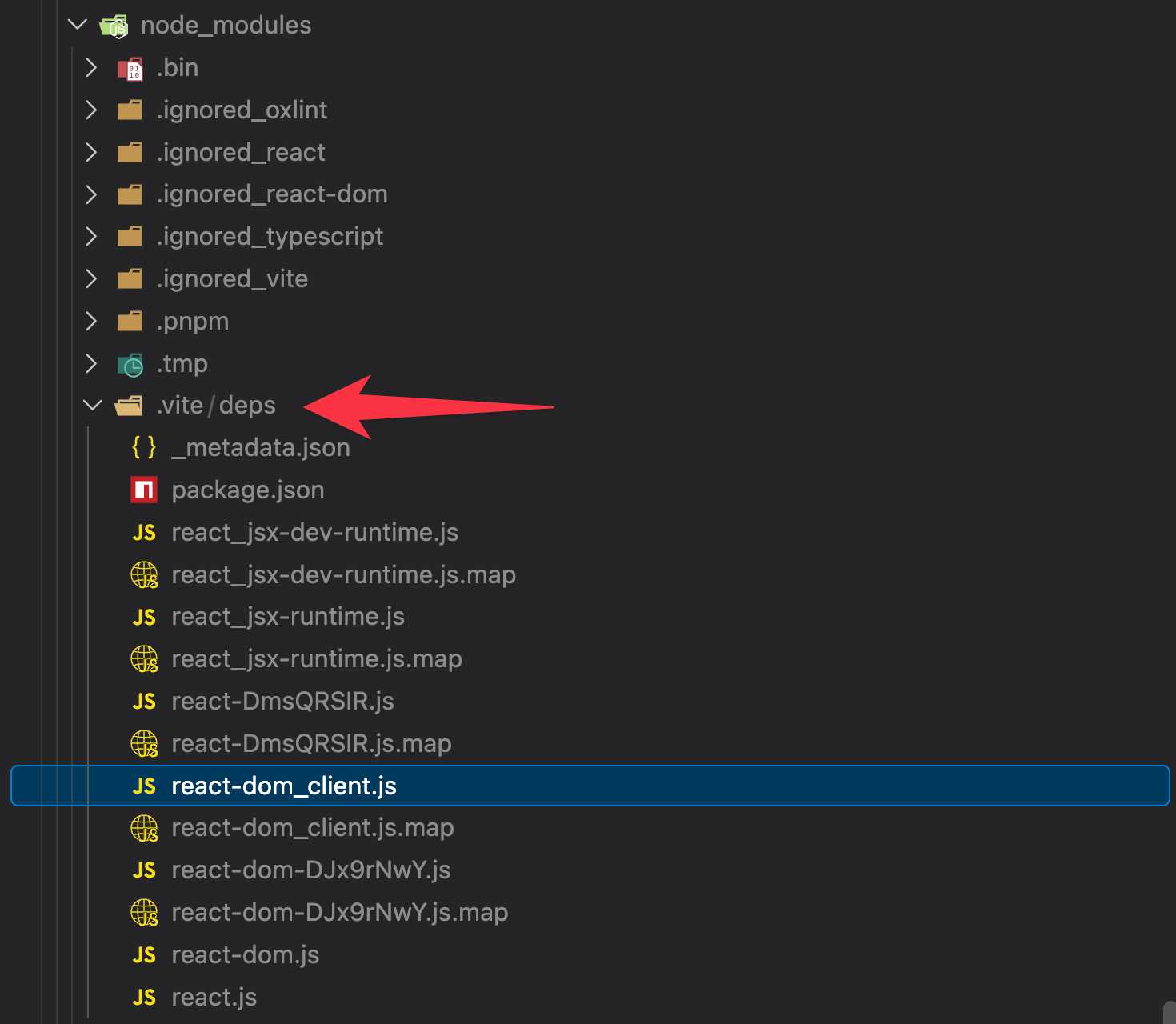
So on first start, Vite pre-bundles your packages into ES modules and caches them in node_modules/.vite/deps. That is the react-dom_client.js you saw above. This only happens in development.
Production still bundles
For production, Vite still bundles your code into a reasonable number of JavaScript files, because shipping hundreds of small files is slow for real users. Until Vite 7 it used two different tools, esbuild in dev (pre-bundling and TypeScript/JSX transforms) and Rollup for the production build.
Vite 8 (March 2026) replaced both with Rolldown, the Rust bundler from the same team, with Oxc handling the transforms and minification.
Recap
And Vitest?
Vitest is a test runner built on top of Vite. Anthony Fu started it in December 2021, with Matias Capeletto (patak) from the Vite team on board early, he even gave it its name.
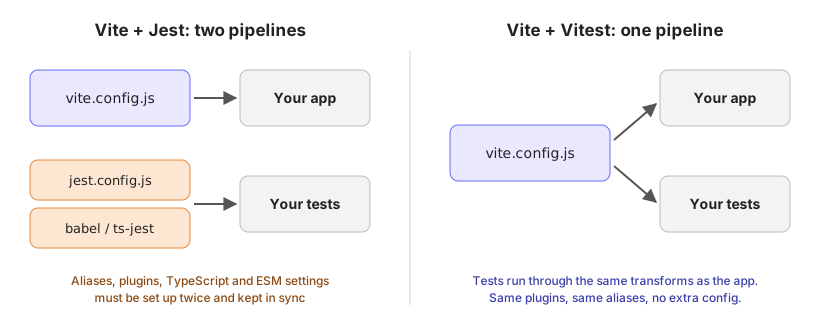
The problem it fixes: your app runs on Vite, but your tests run on Jest. Vite knows your path aliases, TypeScript setup and plugins. Jest does not, so you set it all up again with Babel or ts-jest. Now you have two pipelines to keep in sync, and code that works in the app can break in tests.
Vitest reads the same vite.config.js, so tests go through the same transforms as your app. The API is mostly Jest compatible (describe, it, expect, with vi.fn() instead of jest.fn()), so moving over is often a find and replace. In watch mode it uses Vite’s module graph to rerun only the tests affected by the file you changed.
My takeaways
- We still write apps in JS, but the parsers, bundlers and linters under them are moving to Rust and Go.
- Swapping ESLint for Oxlint is probably the lowest effort win to try today.
- Toolchain speed used to be a nice to have. With agents in the loop, it is a must.
- Vite+ feels like uv for Python: all your tools behind one CLI. My favourite parts are
vp runwith caching and the built-instaged.
Good talk. Maybe next year I will manage an actual conversation.
Published 7 Feb 2026